
كيفية دمج n8n مع Sora2 API: دليل خطوة بخطوة
تعرف على كيفية أتمتة توليد الفيديو بالذكاء الاصطناعي من خلال دمج Sora2 API مع n8n. دليل كامل من إعداد مفتاح API إلى الاستعلام عن النتائج.
في هذا البرنامج التعليمي، سنوضح لك كيفية أتمتة توليد الفيديو بالذكاء الاصطناعي من خلال دمج Sora2 API مع n8n، أداة أتمتة سير العمل القوية. بحلول نهاية هذا الدليل، ستكون قادرًا على تشغيل توليد فيديو بمستوى احترافي من أي مصدر بيانات (مثل Google Sheets أو Telegram أو قاعدة Airtable) تلقائيًا.
- حساب Sora2 API مع اشتراك نشط.
- نسخة n8n (مستضافة ذاتيًا أو سحابية).
- فهم أساسي لـ JSON وطلبات HTTP.
1. إنشاء مفتاح Sora2 API الخاص بك
قبل التوجه إلى n8n، تحتاج إلى بيانات اعتماد المصادقة الخاصة بك. سجل الدخول إلى Sora2 API، وانتقل إلى قسم مفاتيح API، وأنشئ مفتاحًا جديدًا يبدأ بـ 'sk-'.

الخطوة 1: احصل على مفتاح API الخاص بك من وحدة التحكم
2. إعداد عقدة توليد الفيديو
في n8n، أضف عقدة HTTP Request. قم بتعيين Method إلى POST، وURL إلى https://sora2api.org/api/generate-video، واستخدم Header Auth مع 'Authorization: Bearer YOUR_API_KEY'.

الخطوة 2: تكوين طلب HTTP لتوليد الفيديو
3. استخراج معرف المهمة
ستعيد واجهة برمجة التطبيقات taskId. احفظ هذا المعرف للتحقق من حالة توليد الفيديو الخاص بك لاحقًا.
4. تنفيذ منطق الانتظار والاستعلام
أضف عقدة Wait لمدة 30 ثانية، ثم عقدة HTTP Request أخرى لاستدعاء /api/check-video-status باستخدام taskId.
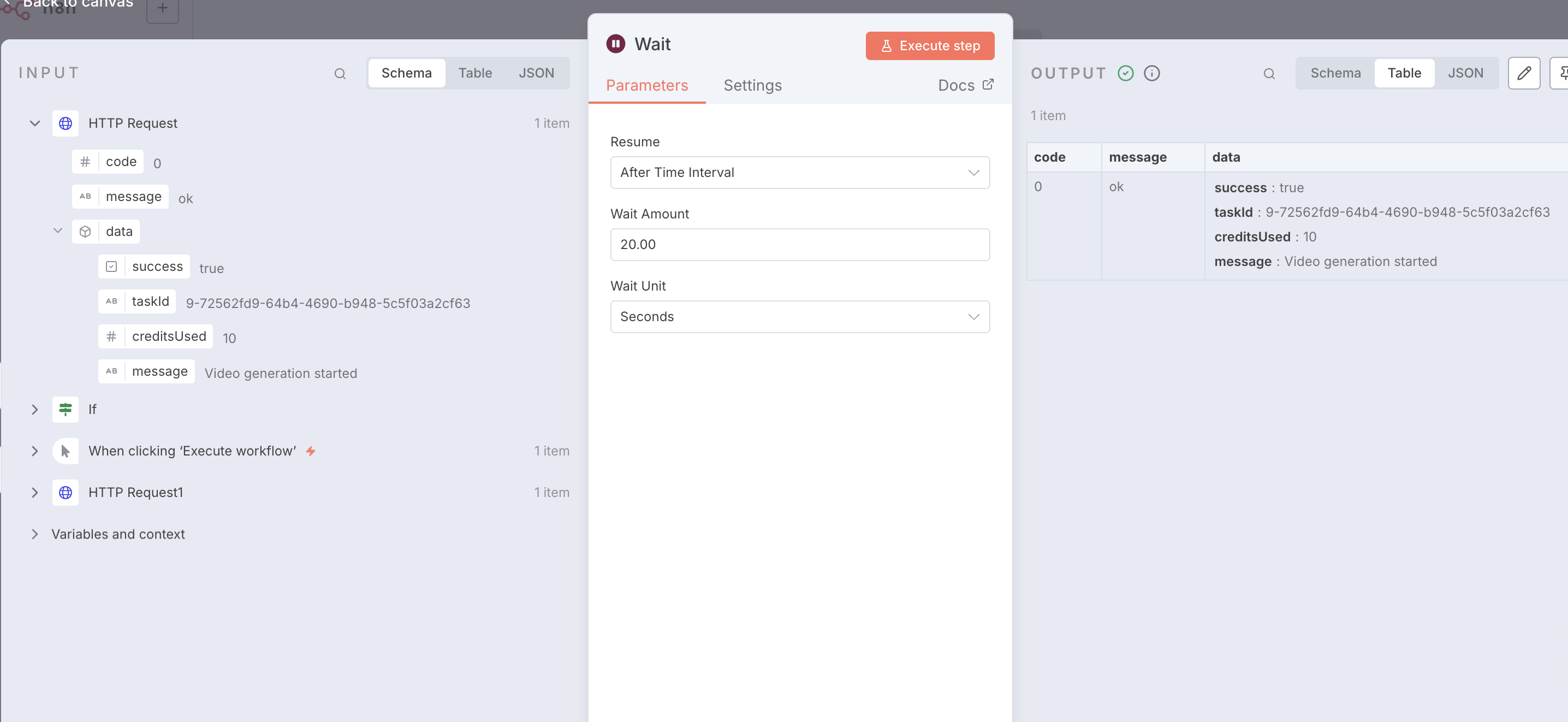
الخطوة 4: تكوين عقدة الانتظار للاستعلام
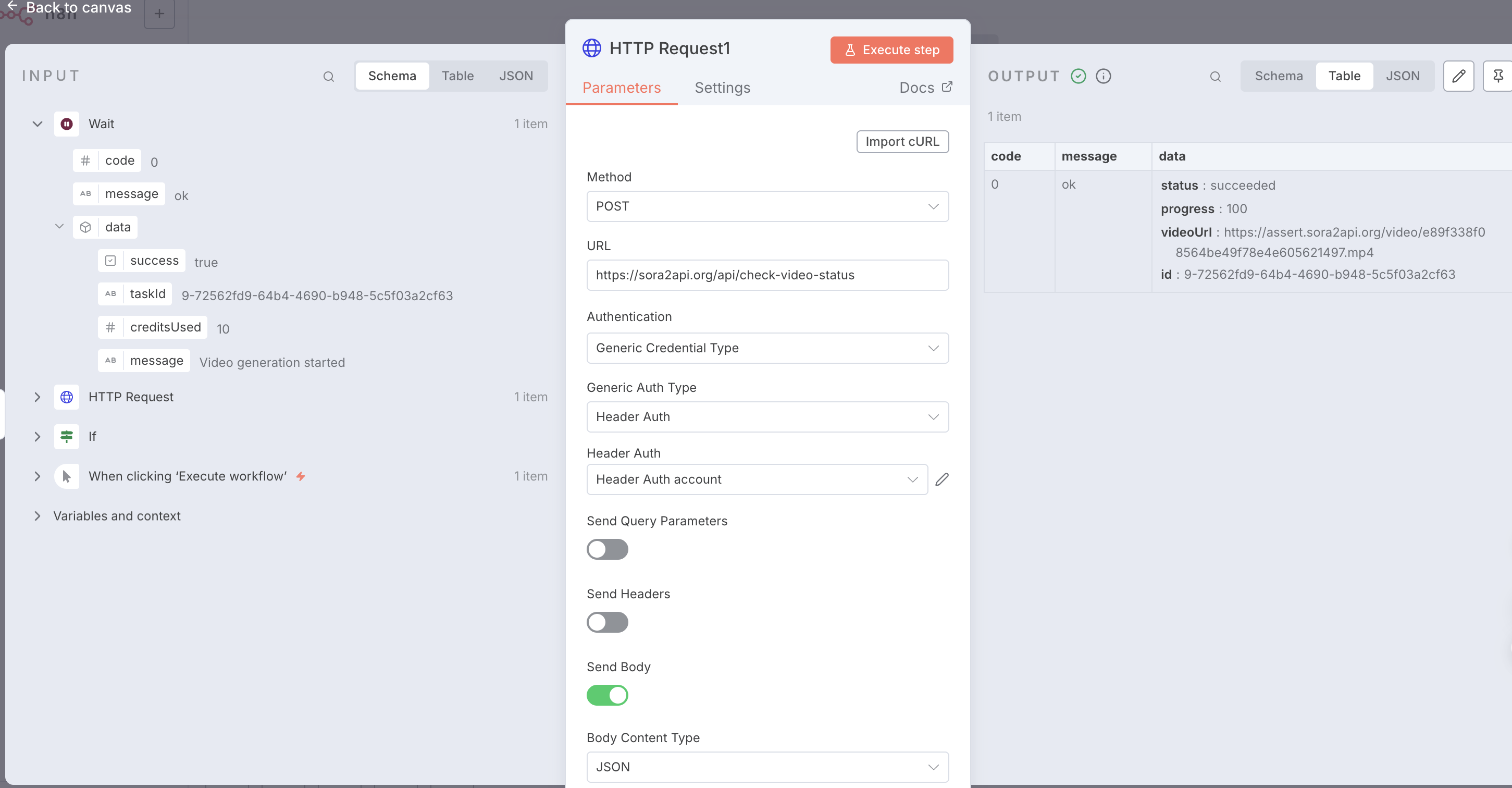
الخطوة 4: فحص استجابة النجاح وعنوان URL للفيديو
5. التحقق من الحالة والتكرار
استخدم عقدة If للتحقق مما إذا كانت الحالة هي 'succeeded'. إذا لم تكن كذلك، فارجع إلى عقدة Wait.
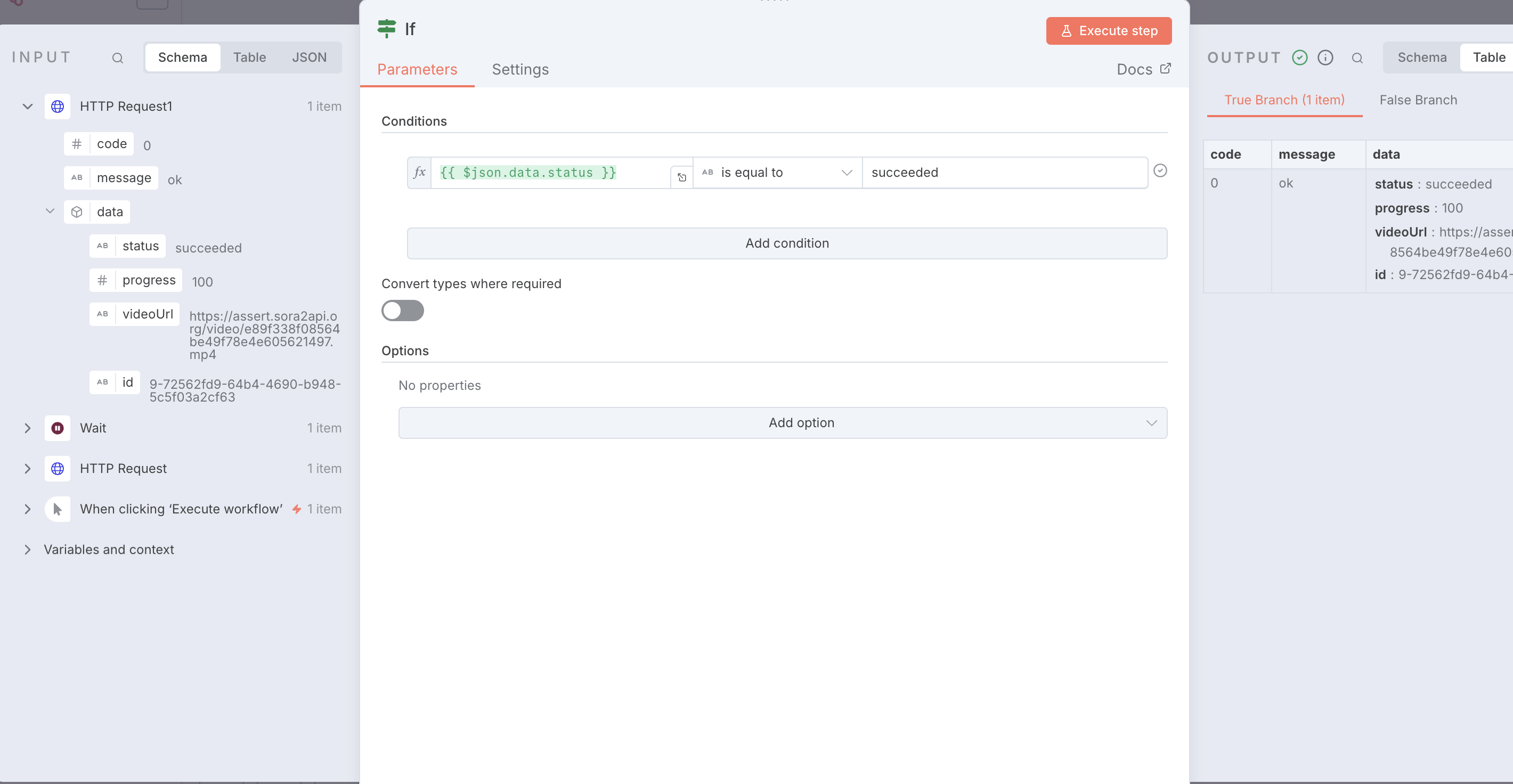
الخطوة 5: استخدام عقدة IF للتحقق من حالة المهمة
{
  "name": "Sora2Api-Workflow-Template",
  "nodes": [
    {
      "parameters": {},
      "type": "n8n-nodes-base.manualTrigger",
      "typeVersion": 1,
      "position": [0, 0],
      "name": "When clicking ‘Execute workflow’"
    },
    {
      "parameters": {
        "method": "POST",
        "url": "https://sora2api.org/api/generate-video",
        "authentication": "genericCredentialType",
        "genericAuthType": "httpHeaderAuth",
        "sendBody": true,
        "specifyBody": "json",
        "jsonBody": "{\n  \"prompt\": \"A beautiful sunset over the ocean\",\n  \"aspectRatio\": \"16:9\",\n  \"type\": \"text2video\",\n  \"duration\": 10\n}",
        "options": {}
      },
      "type": "n8n-nodes-base.httpRequest",
      "typeVersion": 4.2,
      "position": [250, 0],
      "name": "Start Video Generation"
    },
    {
      "parameters": {
        "amount": 30
      },
      "type": "n8n-nodes-base.wait",
      "typeVersion": 1.1,
      "position": [500, 0],
      "name": "Wait 30s"
    },
    {
      "parameters": {
        "method": "POST",
        "url": "https://sora2api.org/api/check-video-status",
        "authentication": "genericCredentialType",
        "genericAuthType": "httpHeaderAuth",
        "sendBody": true,
        "bodyParameters": {
          "parameters": [
            {
              "name": "taskId",
              "value": "={{ $json.data.taskId }}"
            }
          ]
        },
        "options": {}
      },
      "type": "n8n-nodes-base.httpRequest",
      "typeVersion": 4.2,
      "position": [750, 0],
      "name": "Check Status"
    },
    {
      "parameters": {
        "conditions": {
          "options": {
            "caseSensitive": true,
            "leftValue": "",
            "typeValidation": "strict",
            "version": 2
          },
          "conditions": [
            {
              "leftValue": "={{ $json.data.status }}",
              "rightValue": "succeeded",
              "operator": {
                "type": "string",
                "operation": "equals",
                "name": "equals"
              }
            }
          ],
          "combinator": "and"
        },
        "options": {}
      },
      "type": "n8n-nodes-base.if",
      "typeVersion": 2.2,
      "position": [1000, 0],
      "name": "Check if Succeeded"
    },
    {
      "parameters": {
        "assignments": {
          "assignments": [
            {
              "name": "Final_Video_URL",
              "value": "={{ $json.data.videoUrl }}",
              "type": "string"
            }
          ]
        },
        "options": {}
      },
      "type": "n8n-nodes-base.set",
      "typeVersion": 3.4,
      "position": [1250, -100],
      "name": "Final Result"
    }
  ],
  "connections": {
    "When clicking ‘Execute workflow’": {
      "main": [[{"node": "Start Video Generation", "type": "main", "index": 0}]]
    },
    "Start Video Generation": {
      "main": [[{"node": "Wait", "type": "main", "index": 0}]]
    },
    "Wait": {
      "main": [[{"node": "Check Status", "type": "main", "index": 0}]]
    },
    "Check Status": {
      "main": [[{"node": "Check if Succeeded", "type": "main", "index": 0}]]
    },
    "Check if Succeeded": {
      "main": [
        [{"node": "Final Result", "type": "main", "index": 0}],
        [{"node": "Wait", "type": "main", "index": 0}]
      ]
    }
  }
}