
n8n と Sora2 API を統合する方法:ステップバイステップガイド
Sora2 API と n8n を統合して、AI 動画生成を自動化する方法を学びます。API キーの設定から結果のポーリングまでを網羅した完全ガイド。
このチュートリアルでは、強力なワークフロー自動化ツールである n8n と Sora2 API を統合して、AI 動画生成を自動化する方法を紹介します。このガイドを終える頃には、Google スプレッドシート、Telegram、Airtable ベースなどのあらゆるデータソースから、プロ品質の動画生成を自動的にトリガーできるようになります。
- 有効なサブスクリプションを持つ Sora2 API アカウント。
- n8n インスタンス(セルフホストまたはクラウド)。
- JSON と HTTP リクエストに関する基本的な知識。
1. Sora2 API キーを生成する
n8n に向かう前に、認証資格情報が必要です。Sora2 API にログインし、API キーセクションに移動して、'sk-' で始まる新しいキーを作成します。

ステップ 1:コンソールから API キーを取得する
2. 動画生成ノードを設定する
n8n で HTTP Request ノードを追加します。Method を POST に、URL を https://sora2api.org/api/generate-video に設定し、'Authorization: Bearer YOUR_API_KEY' を指定した Header Auth を使用します。

ステップ 2:動画生成用の HTTP リクエストを設定する
3. タスク ID を抽出する
API は taskId を返します。後で動画生成のステータスを確認するために、この ID を保存します。
4. 待機とポーリングのロジックを実装する
30 秒間の Wait ノードを追加し، その後に taskId を使用して /api/check-video-status を呼び出す別の HTTP Request ノードを追加します。
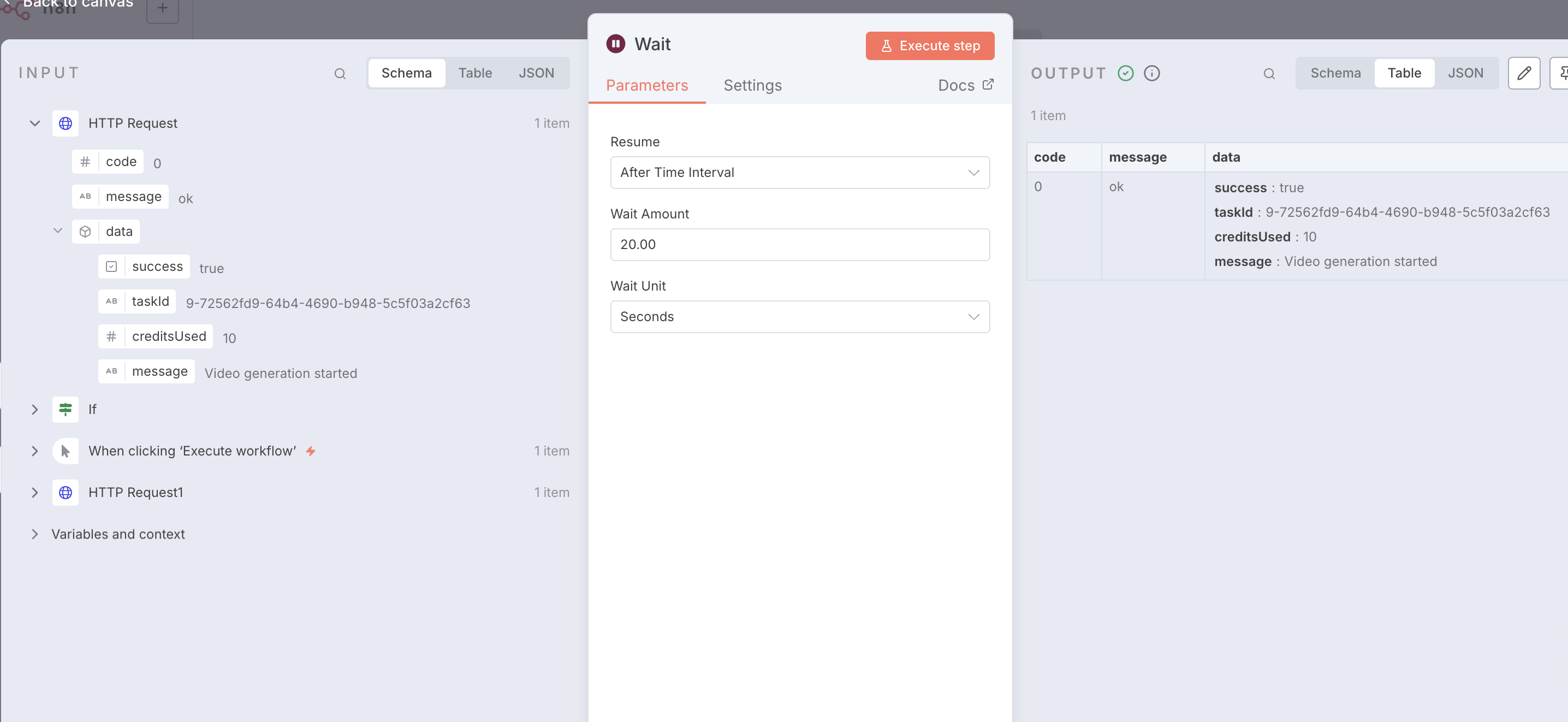
ステップ 4:ポーリング用の Wait ノードを設定する
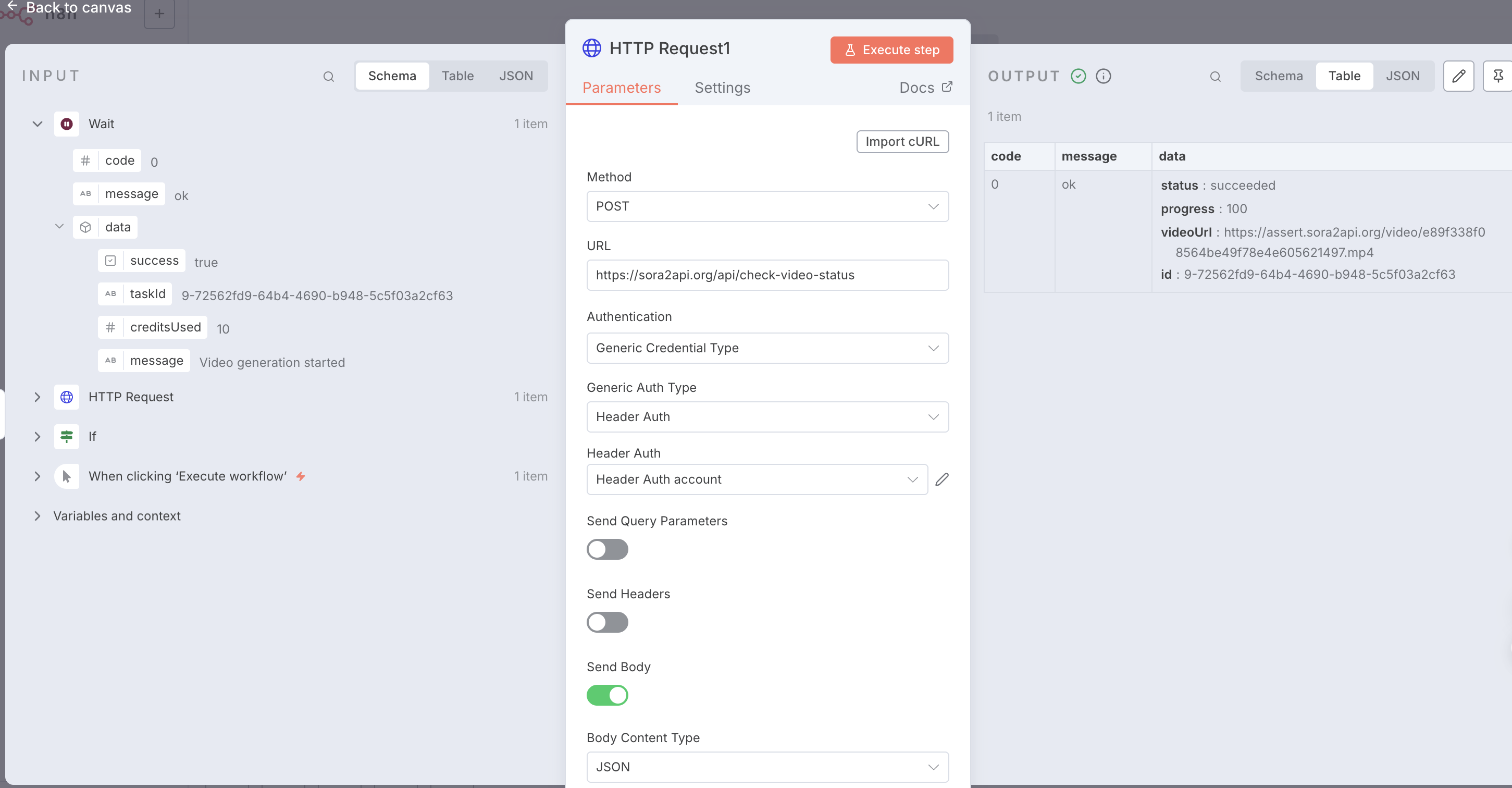
ステップ 4:成功レスポンスと動画 URL を確認する
5. ステータスを確認してループする
If ノードを使用して、ステータスが 'succeeded' かどうかを確認します。そうでない場合は、Wait ノードにループバックします。
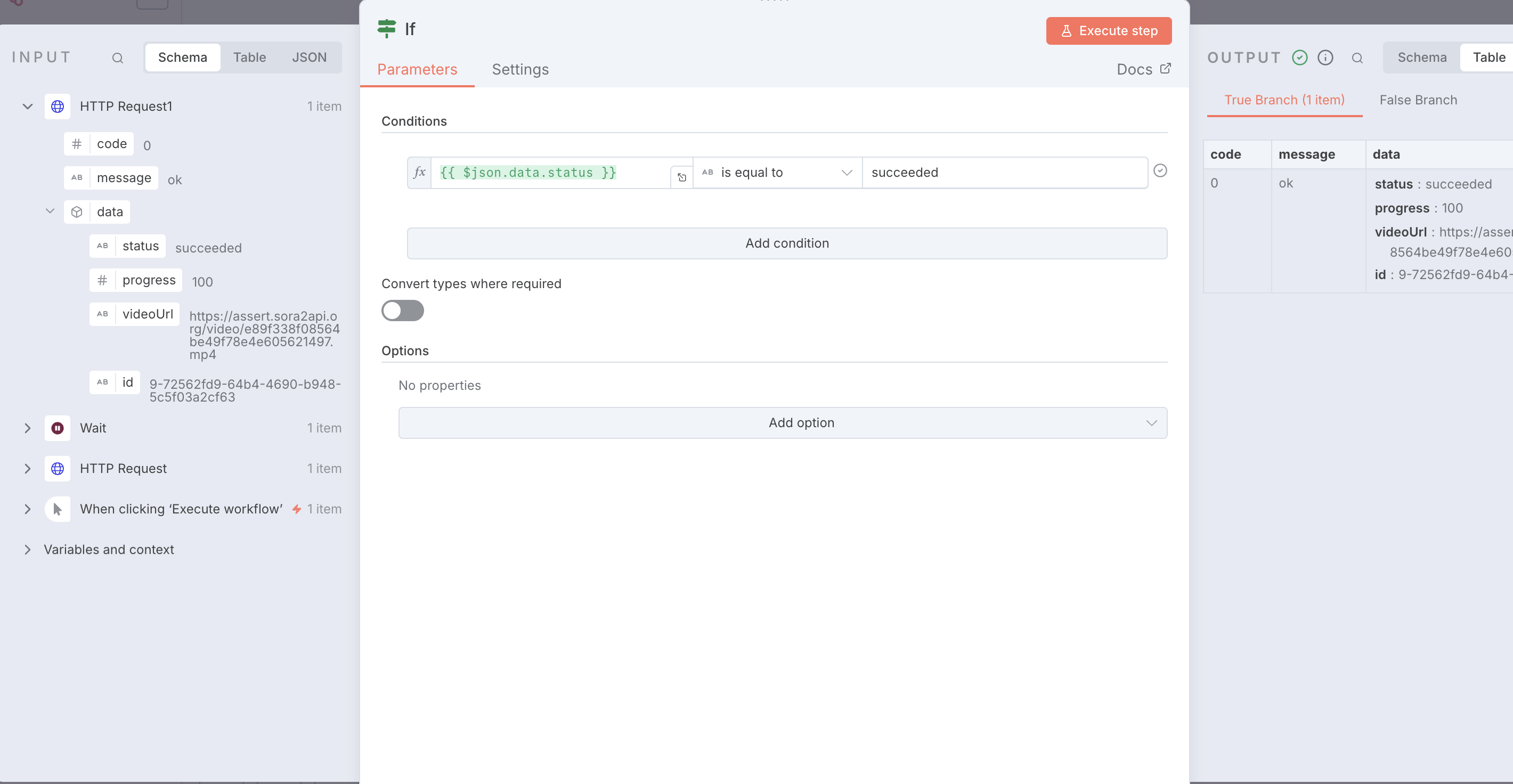
ステップ 5:IF ノードを使用してタスクステータスを確認する
{
  "name": "Sora2Api-Workflow-Template",
  "nodes": [
    {
      "parameters": {},
      "type": "n8n-nodes-base.manualTrigger",
      "typeVersion": 1,
      "position": [0, 0],
      "name": "When clicking ‘Execute workflow’"
    },
    {
      "parameters": {
        "method": "POST",
        "url": "https://sora2api.org/api/generate-video",
        "authentication": "genericCredentialType",
        "genericAuthType": "httpHeaderAuth",
        "sendBody": true,
        "specifyBody": "json",
        "jsonBody": "{\n  \"prompt\": \"A beautiful sunset over the ocean\",\n  \"aspectRatio\": \"16:9\",\n  \"type\": \"text2video\",\n  \"duration\": 10\n}",
        "options": {}
      },
      "type": "n8n-nodes-base.httpRequest",
      "typeVersion": 4.2,
      "position": [250, 0],
      "name": "Start Video Generation"
    },
    {
      "parameters": {
        "amount": 30
      },
      "type": "n8n-nodes-base.wait",
      "typeVersion": 1.1,
      "position": [500, 0],
      "name": "Wait 30s"
    },
    {
      "parameters": {
        "method": "POST",
        "url": "https://sora2api.org/api/check-video-status",
        "authentication": "genericCredentialType",
        "genericAuthType": "httpHeaderAuth",
        "sendBody": true,
        "bodyParameters": {
          "parameters": [
            {
              "name": "taskId",
              "value": "={{ $json.data.taskId }}"
            }
          ]
        },
        "options": {}
      },
      "type": "n8n-nodes-base.httpRequest",
      "typeVersion": 4.2,
      "position": [750, 0],
      "name": "Check Status"
    },
    {
      "parameters": {
        "conditions": {
          "options": {
            "caseSensitive": true,
            "leftValue": "",
            "typeValidation": "strict",
            "version": 2
          },
          "conditions": [
            {
              "leftValue": "={{ $json.data.status }}",
              "rightValue": "succeeded",
              "operator": {
                "type": "string",
                "operation": "equals",
                "name": "equals"
              }
            }
          ],
          "combinator": "and"
        },
        "options": {}
      },
      "type": "n8n-nodes-base.if",
      "typeVersion": 2.2,
      "position": [1000, 0],
      "name": "Check if Succeeded"
    },
    {
      "parameters": {
        "assignments": {
          "assignments": [
            {
              "name": "Final_Video_URL",
              "value": "={{ $json.data.videoUrl }}",
              "type": "string"
            }
          ]
        },
        "options": {}
      },
      "type": "n8n-nodes-base.set",
      "typeVersion": 3.4,
      "position": [1250, -100],
      "name": "Final Result"
    }
  ],
  "connections": {
    "When clicking ‘Execute workflow’": {
      "main": [[{"node": "Start Video Generation", "type": "main", "index": 0}]]
    },
    "Start Video Generation": {
      "main": [[{"node": "Wait", "type": "main", "index": 0}]]
    },
    "Wait": {
      "main": [[{"node": "Check Status", "type": "main", "index": 0}]]
    },
    "Check Status": {
      "main": [[{"node": "Check if Succeeded", "type": "main", "index": 0}]]
    },
    "Check if Succeeded": {
      "main": [
        [{"node": "Final Result", "type": "main", "index": 0}],
        [{"node": "Wait", "type": "main", "index": 0}]
      ]
    }
  }
}