
n8n과 Sora2 API 연동 방법: 단계별 가이드
Sora2 API와 n8n을 연동하여 AI 비디오 생성을 자동화하는 방법을 배웁니다. API 키 설정부터 결과 폴링까지의 전체 가이드.
이 튜토리얼에서는 강력한 워크플로 자동화 도구인 n8n과 Sora2 API를 연동하여 AI 비디오 생성을 자동화하는 방법을 보여드립니다. 이 가이드를 마칠 때쯤이면 Google Sheets, Telegram 또는 Airtable 베이스와 같은 모든 데이터 소스에서 프로급 비디오 생성을 자동으로 트리거할 수 있게 됩니다.
- 유효한 구독이 있는 Sora2 API 계정.
- n8n 인스턴스(자체 호스팅 또는 클라우드).
- JSON 및 HTTP 요청에 대한 기본 이해.
1. Sora2 API 키 생성
n8n으로 가기 전에 인증 자격 증명이 필요합니다. Sora2 API에 로그인하고 API 키 섹션으로 이동하여 'sk-'로 시작하는 새 키를 만듭니다.

단계 1: 콘솔에서 API 키 얻기
2. 비디오 생성 노드 설정
n8n에서 HTTP Request 노드를 추가합니다. Method를 POST로, URL을 https://sora2api.org/api/generate-video로 설정하고 'Authorization: Bearer YOUR_API_KEY'가 포함된 Header Auth를 사용합니다.

단계 2: 비디오 생성용 HTTP 요청 구성
3. 작업 ID 추출
API는 taskId를 반환합니다. 나중에 비디오 생성 상태를 확인하기 위해 이 ID를 저장합니다.
4. 대기 및 폴링 로직 구현
30초 동안 대기하는 Wait 노드를 추가한 다음, taskId를 사용하여 /api/check-video-status를 호출하는 다른 HTTP Request 노드를 추가합니다.
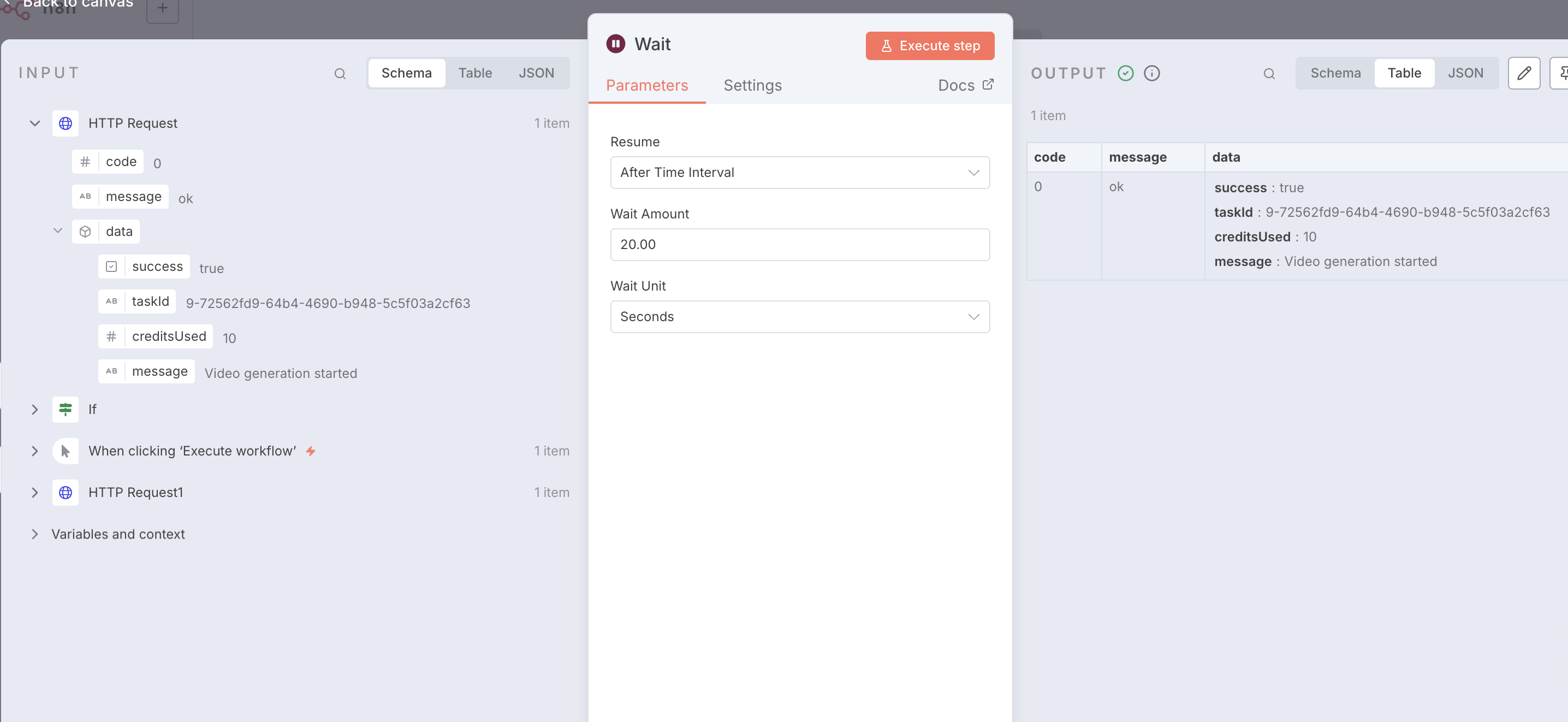
단계 4: 폴링을 위한 대기 노드 구성
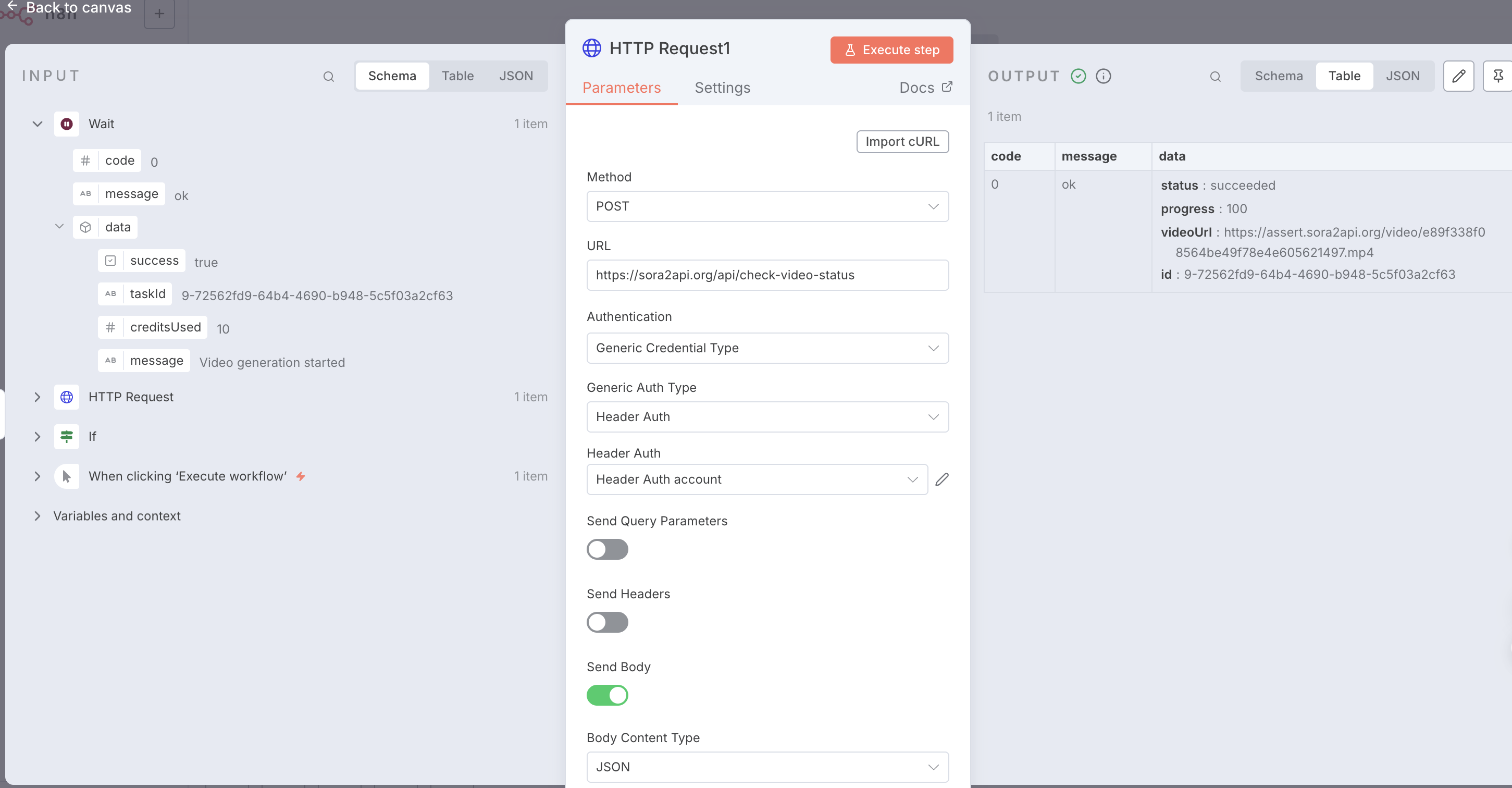
단계 4: 성공 응답 및 비디오 URL 확인
5. 상태 확인 및 루프
If 노드를 사용하여 상태가 'succeeded'인지 확인합니다. 그렇지 않으면 Wait 노드로 루프백합니다.
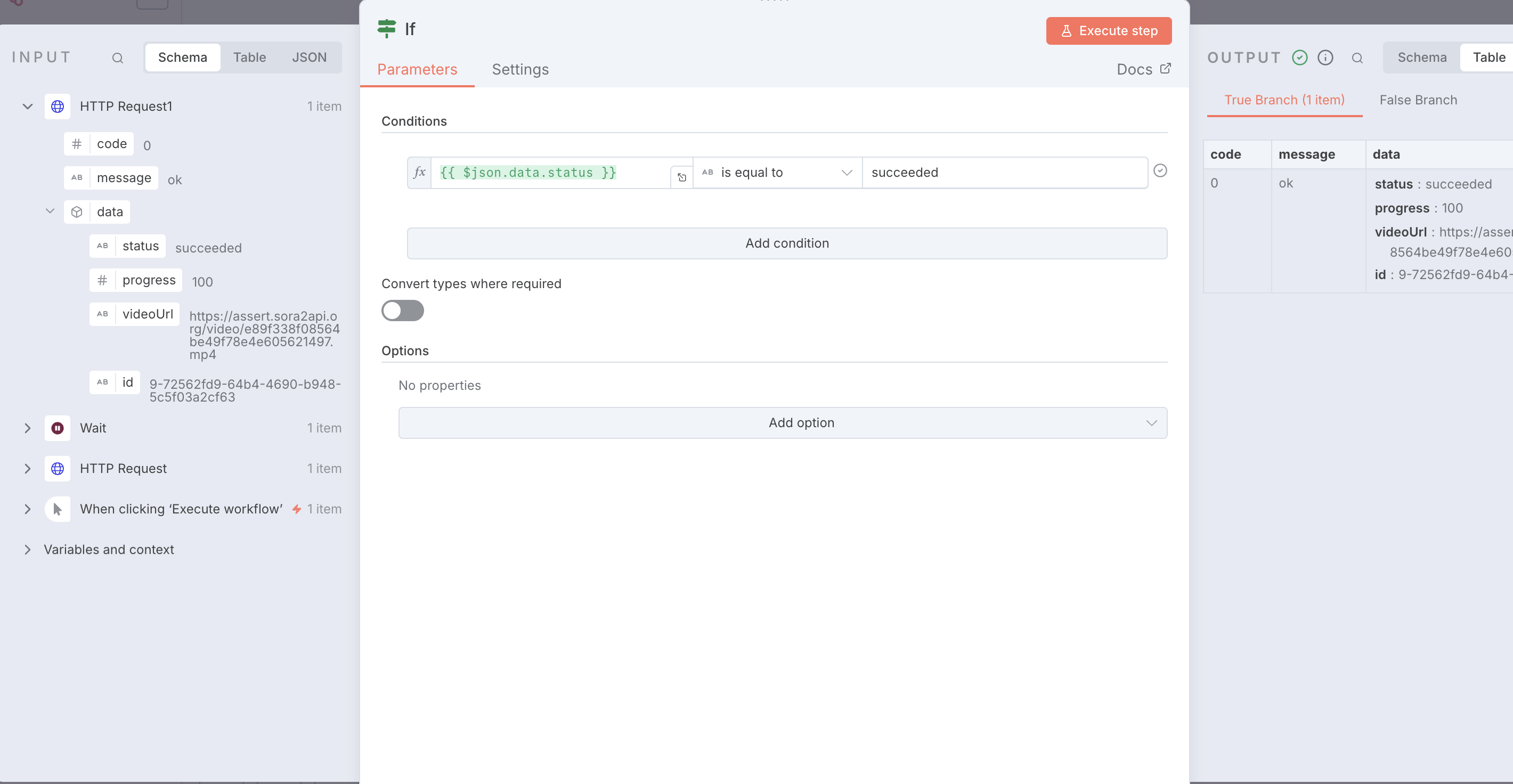
단계 5: IF 노드를 사용하여 작업 상태 확인
{
  "name": "Sora2Api-Workflow-Template",
  "nodes": [
    {
      "parameters": {},
      "type": "n8n-nodes-base.manualTrigger",
      "typeVersion": 1,
      "position": [0, 0],
      "name": "When clicking ‘Execute workflow’"
    },
    {
      "parameters": {
        "method": "POST",
        "url": "https://sora2api.org/api/generate-video",
        "authentication": "genericCredentialType",
        "genericAuthType": "httpHeaderAuth",
        "sendBody": true,
        "specifyBody": "json",
        "jsonBody": "{\n  \"prompt\": \"A beautiful sunset over the ocean\",\n  \"aspectRatio\": \"16:9\",\n  \"type\": \"text2video\",\n  \"duration\": 10\n}",
        "options": {}
      },
      "type": "n8n-nodes-base.httpRequest",
      "typeVersion": 4.2,
      "position": [250, 0],
      "name": "Start Video Generation"
    },
    {
      "parameters": {
        "amount": 30
      },
      "type": "n8n-nodes-base.wait",
      "typeVersion": 1.1,
      "position": [500, 0],
      "name": "Wait 30s"
    },
    {
      "parameters": {
        "method": "POST",
        "url": "https://sora2api.org/api/check-video-status",
        "authentication": "genericCredentialType",
        "genericAuthType": "httpHeaderAuth",
        "sendBody": true,
        "bodyParameters": {
          "parameters": [
            {
              "name": "taskId",
              "value": "={{ $json.data.taskId }}"
            }
          ]
        },
        "options": {}
      },
      "type": "n8n-nodes-base.httpRequest",
      "typeVersion": 4.2,
      "position": [750, 0],
      "name": "Check Status"
    },
    {
      "parameters": {
        "conditions": {
          "options": {
            "caseSensitive": true,
            "leftValue": "",
            "typeValidation": "strict",
            "version": 2
          },
          "conditions": [
            {
              "leftValue": "={{ $json.data.status }}",
              "rightValue": "succeeded",
              "operator": {
                "type": "string",
                "operation": "equals",
                "name": "equals"
              }
            }
          ],
          "combinator": "and"
        },
        "options": {}
      },
      "type": "n8n-nodes-base.if",
      "typeVersion": 2.2,
      "position": [1000, 0],
      "name": "Check if Succeeded"
    },
    {
      "parameters": {
        "assignments": {
          "assignments": [
            {
              "name": "Final_Video_URL",
              "value": "={{ $json.data.videoUrl }}",
              "type": "string"
            }
          ]
        },
        "options": {}
      },
      "type": "n8n-nodes-base.set",
      "typeVersion": 3.4,
      "position": [1250, -100],
      "name": "Final Result"
    }
  ],
  "connections": {
    "When clicking ‘Execute workflow’": {
      "main": [[{"node": "Start Video Generation", "type": "main", "index": 0}]]
    },
    "Start Video Generation": {
      "main": [[{"node": "Wait", "type": "main", "index": 0}]]
    },
    "Wait": {
      "main": [[{"node": "Check Status", "type": "main", "index": 0}]]
    },
    "Check Status": {
      "main": [[{"node": "Check if Succeeded", "type": "main", "index": 0}]]
    },
    "Check if Succeeded": {
      "main": [
        [{"node": "Final Result", "type": "main", "index": 0}],
        [{"node": "Wait", "type": "main", "index": 0}]
      ]
    }
  }
}