
如何将 n8n 与 Sora2 API 集成:分步指南
学习如何通过将 Sora2 API 与 n8n 集成来自动化 AI 视频生成流程。从 API 密钥设置到结果轮询的完整指南。
简介
在本教程中,我们将向您展示如何通过集成 Sora2 API 与 n8n(强大的工作流自动化工具)来自动化 AI 视频生成。在本指南结束时,您将能够自动从任何数据源(如 Google 表格、Telegram 或 Airtable 数据库)触发专业级的视频生成。
先决条件
- 拥有有效订阅的 Sora2 API 账户。
- 一个 n8n 实例(自托管或云端)。
- 对 JSON 和 HTTP 请求的基本了解。
集成步骤
1
1. 生成您的 Sora2 API 密钥
在前往 n8n 之前,您需要身份验证凭据。登录 Sora2 API,导航到 API 密钥部分,并创建一个以 'sk-' 开头的新密钥。

步骤 1:从控制台获取您的 API 密钥
2
2. 设置视频生成节点
在 n8n 中,添加一个 HTTP Request 节点。将方法设置为 POST,URL 设置为 https://sora2api.org/api/generate-video,并使用带有 'Authorization: Bearer YOUR_API_KEY' 的 Header Auth。

步骤 2:配置视频生成请求节点
3
3. 提取任务 ID
API 将返回一个 taskId。保存此 ID,以便稍后检查视频生成的状态。
4
4. 实现等待和轮询逻辑
添加一个 Wait 节点等待 30 秒,然后添加另一个 HTTP Request 节点调用 /api/check-video-status 并传入 taskId。
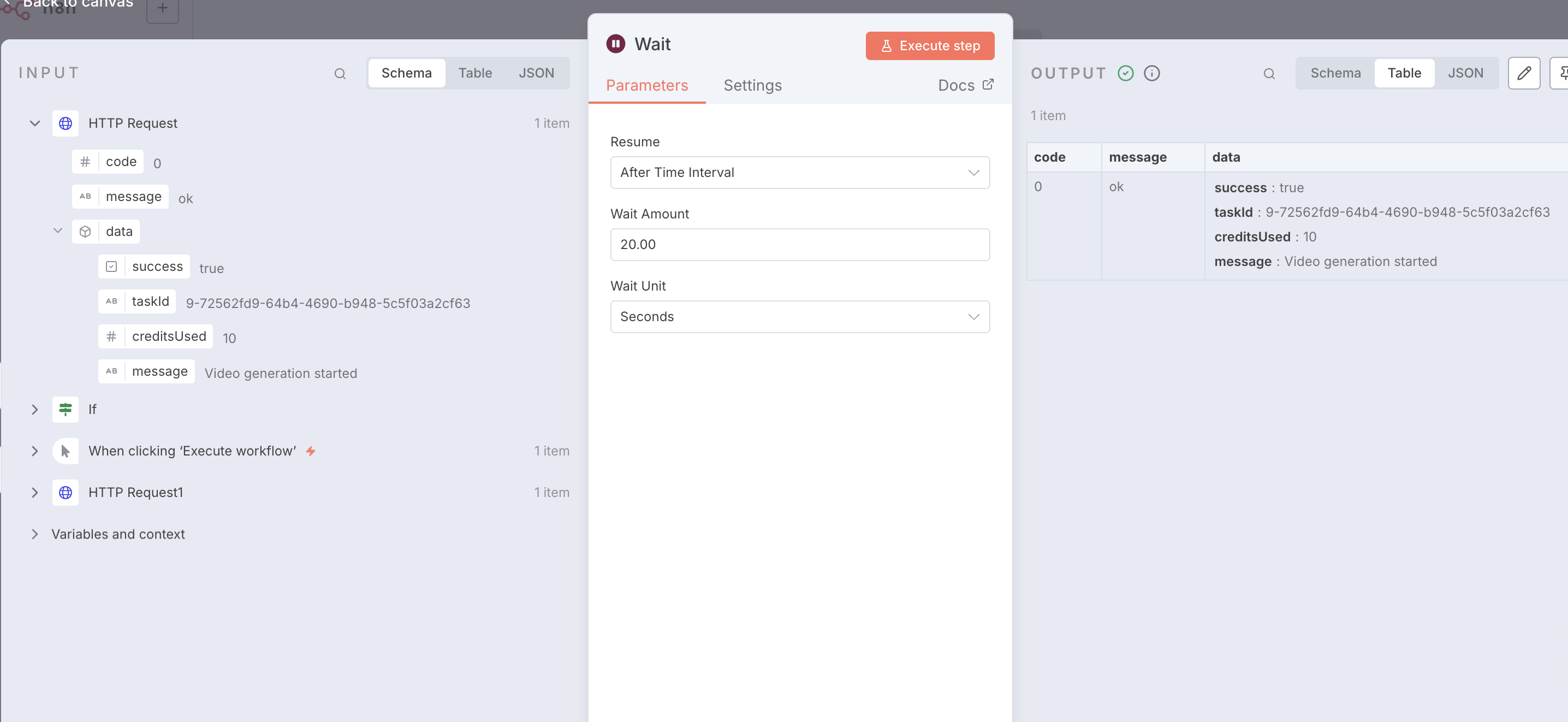
步骤 4:配置等待与轮询逻辑
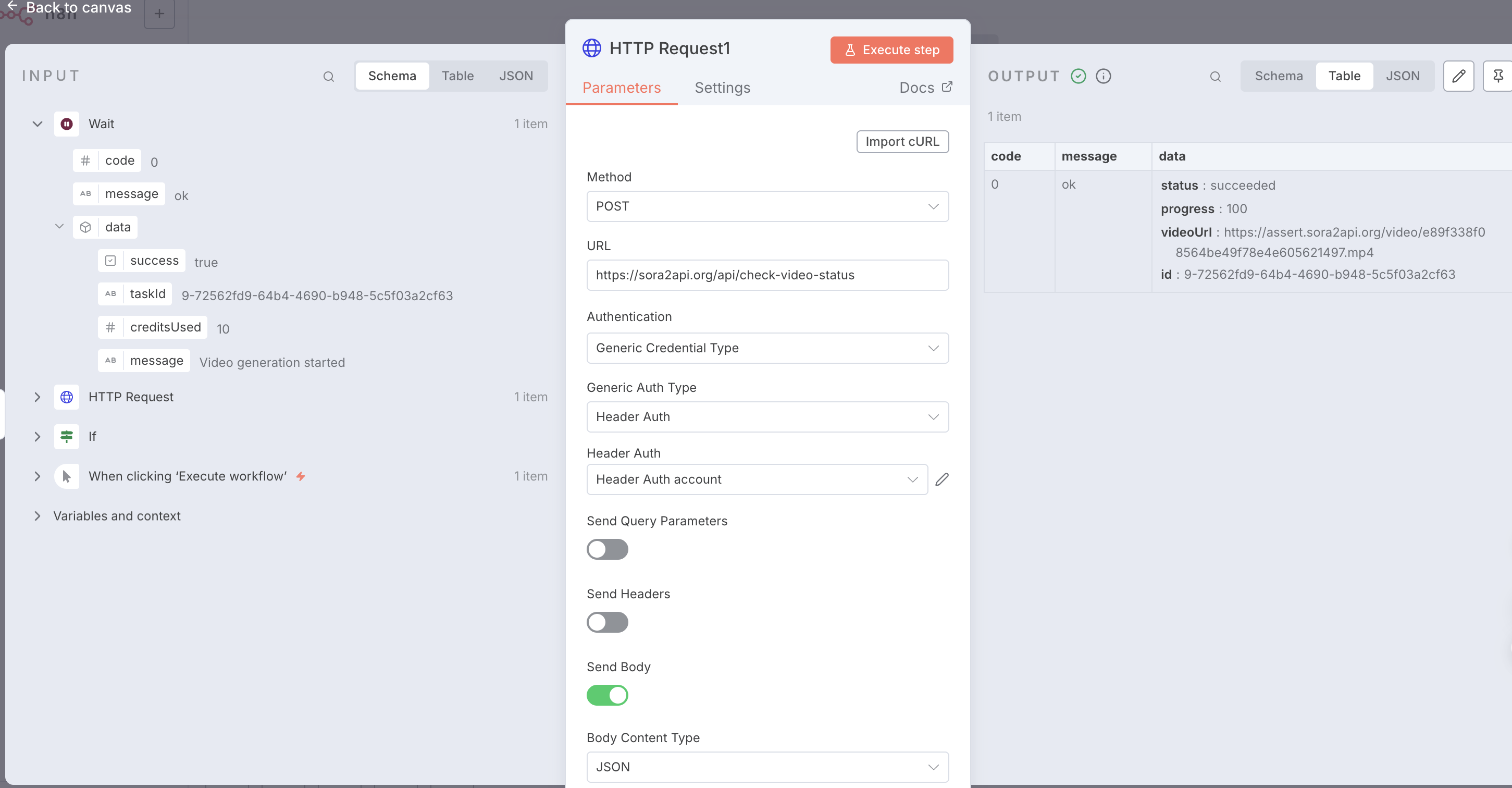
步骤 4:查看成功响应与视频地址
5
5. 检查状态并循环
使用 If 节点检查状态是否为 'succeeded'。如果不是,则循环回 Wait 节点。
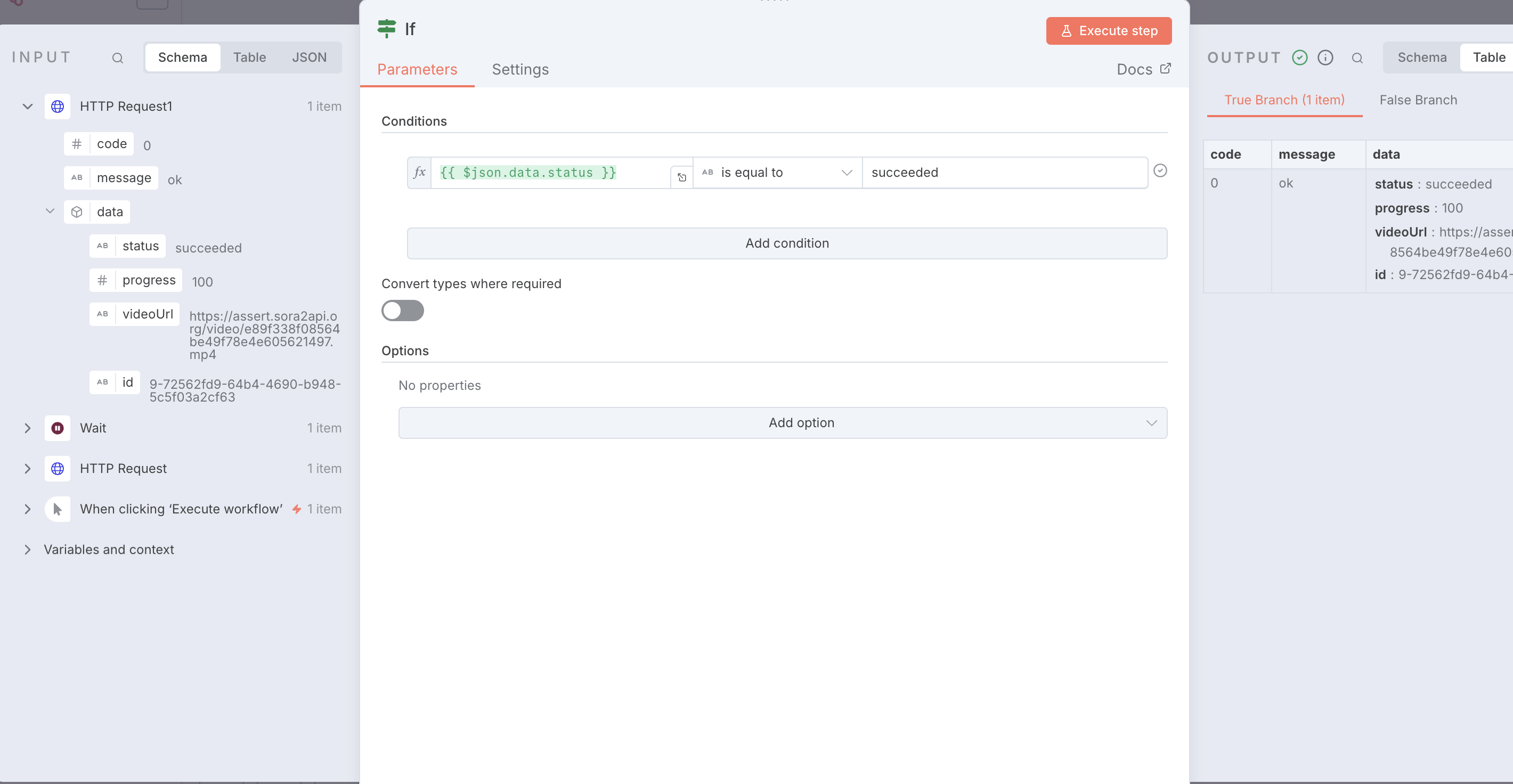
步骤 5:使用 IF 节点判断任务状态
一键导入:工作流模板
复制下面的 JSON 代码并直接粘贴到您的 n8n 工作区中,即可立即获得一个预配置好的完整工作流。
{
  "name": "Sora2Api-Workflow-Template",
  "nodes": [
    {
      "parameters": {},
      "type": "n8n-nodes-base.manualTrigger",
      "typeVersion": 1,
      "position": [0, 0],
      "name": "When clicking ‘Execute workflow’"
    },
    {
      "parameters": {
        "method": "POST",
        "url": "https://sora2api.org/api/generate-video",
        "authentication": "genericCredentialType",
        "genericAuthType": "httpHeaderAuth",
        "sendBody": true,
        "specifyBody": "json",
        "jsonBody": "{\n  \"prompt\": \"A beautiful sunset over the ocean\",\n  \"aspectRatio\": \"16:9\",\n  \"type\": \"text2video\",\n  \"duration\": 10\n}",
        "options": {}
      },
      "type": "n8n-nodes-base.httpRequest",
      "typeVersion": 4.2,
      "position": [250, 0],
      "name": "Start Video Generation"
    },
    {
      "parameters": {
        "amount": 30
      },
      "type": "n8n-nodes-base.wait",
      "typeVersion": 1.1,
      "position": [500, 0],
      "name": "Wait 30s"
    },
    {
      "parameters": {
        "method": "POST",
        "url": "https://sora2api.org/api/check-video-status",
        "authentication": "genericCredentialType",
        "genericAuthType": "httpHeaderAuth",
        "sendBody": true,
        "bodyParameters": {
          "parameters": [
            {
              "name": "taskId",
              "value": "={{ $json.data.taskId }}"
            }
          ]
        },
        "options": {}
      },
      "type": "n8n-nodes-base.httpRequest",
      "typeVersion": 4.2,
      "position": [750, 0],
      "name": "Check Status"
    },
    {
      "parameters": {
        "conditions": {
          "options": {
            "caseSensitive": true,
            "leftValue": "",
            "typeValidation": "strict",
            "version": 2
          },
          "conditions": [
            {
              "leftValue": "={{ $json.data.status }}",
              "rightValue": "succeeded",
              "operator": {
                "type": "string",
                "operation": "equals",
                "name": "equals"
              }
            }
          ],
          "combinator": "and"
        },
        "options": {}
      },
      "type": "n8n-nodes-base.if",
      "typeVersion": 2.2,
      "position": [1000, 0],
      "name": "Check if Succeeded"
    },
    {
      "parameters": {
        "assignments": {
          "assignments": [
            {
              "name": "Final_Video_URL",
              "value": "={{ $json.data.videoUrl }}",
              "type": "string"
            }
          ]
        },
        "options": {}
      },
      "type": "n8n-nodes-base.set",
      "typeVersion": 3.4,
      "position": [1250, -100],
      "name": "Final Result"
    }
  ],
  "connections": {
    "When clicking ‘Execute workflow’": {
      "main": [[{"node": "Start Video Generation", "type": "main", "index": 0}]]
    },
    "Start Video Generation": {
      "main": [[{"node": "Wait", "type": "main", "index": 0}]]
    },
    "Wait": {
      "main": [[{"node": "Check Status", "type": "main", "index": 0}]]
    },
    "Check Status": {
      "main": [[{"node": "Check if Succeeded", "type": "main", "index": 0}]]
    },
    "Check if Succeeded": {
      "main": [
        [{"node": "Final Result", "type": "main", "index": 0}],
        [{"node": "Wait", "type": "main", "index": 0}]
      ]
    }
  }
}