
How to Integrate n8n with Sora2 API: Step-by-Step Guide
Learn how to automate AI video generation by integrating Sora2 API with n8n. Complete guide from API key setup to polling for results.
In this tutorial, we will show you how to automate AI video generation by integrating Sora2 API with n8n, the powerful workflow automation tool. By the end of this guide, you'll be able to trigger professional-grade video generation from any data source (like Google Sheets, Telegram, or an Airtable base) automatically.
- A Sora2 API account with an active subscription.
- An n8n instance (self-hosted or Cloud).
- Basic understanding of JSON and HTTP requests.
1. Generate Your Sora2 API Key
Before heading to n8n, you need your authentication credentials. Log in to Sora2 API, navigate to the API Keys section, and create a new key starting with 'sk-'.

Step 1: Obtain your API Key from the Console
2. Set Up the Video Generation Node
In n8n, add an HTTP Request node. Set Method to POST, URL to https://sora2api.org/api/generate-video, and use Header Auth with 'Authorization: Bearer YOUR_API_KEY'.

Step 2: Configure HTTP Request for Video Generation
3. Extract the Task ID
The API will return a taskId. Save this ID to check the status of your video generation later.
4. Implement Wait and Poll Logic
Add a Wait node for 30 seconds, then another HTTP Request node to call /api/check-video-status with the taskId.
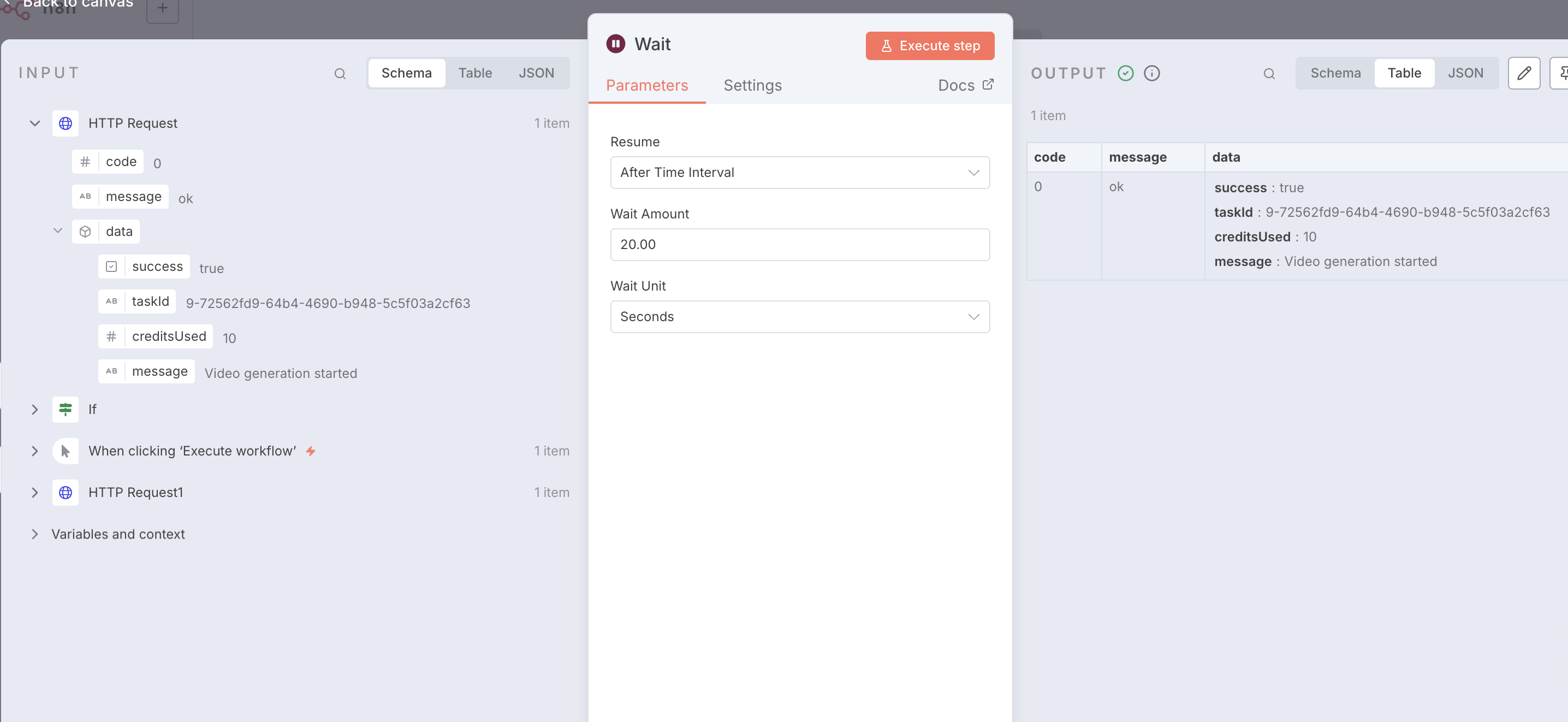
Step 4: Configure Wait Node for Polling
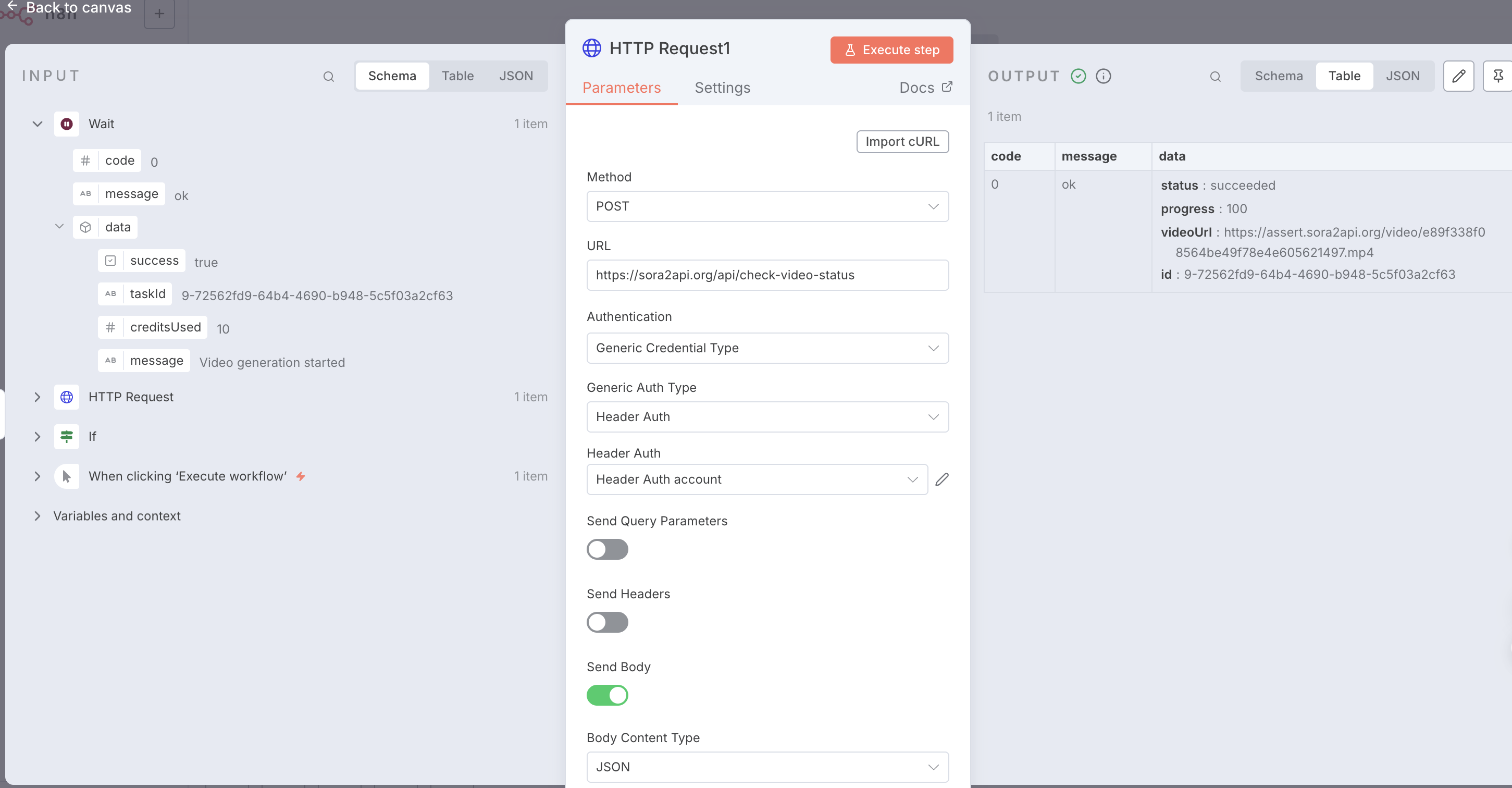
Step 4: Inspect Success Response and Video URL
5. Check Status and Loop
Use an If node to check if status is 'succeeded'. If not, loop back to the Wait node.
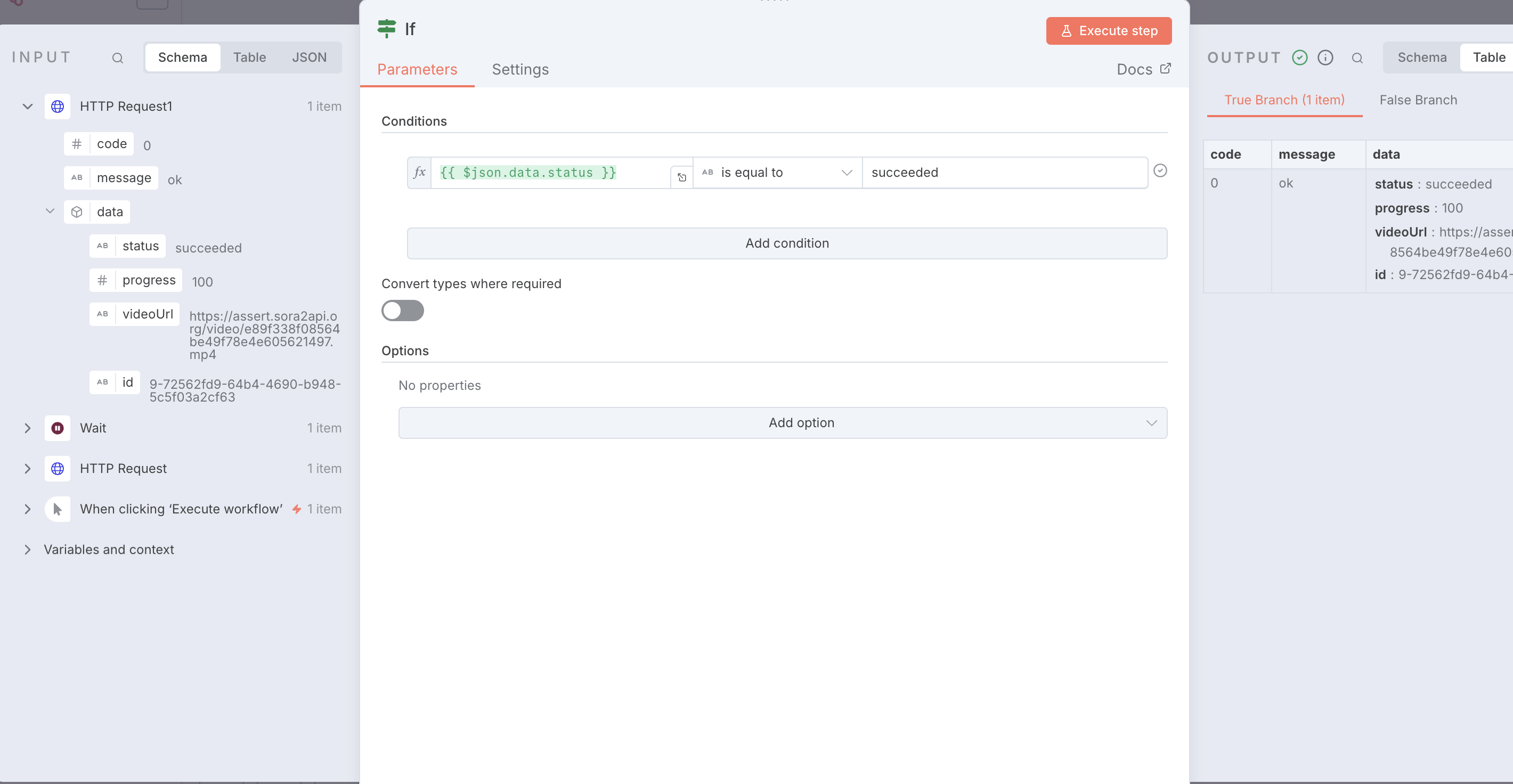
Step 5: Use IF Node to Check Status
{
  "name": "Sora2Api-Workflow-Template",
  "nodes": [
    {
      "parameters": {},
      "type": "n8n-nodes-base.manualTrigger",
      "typeVersion": 1,
      "position": [0, 0],
      "name": "When clicking ‘Execute workflow’"
    },
    {
      "parameters": {
        "method": "POST",
        "url": "https://sora2api.org/api/generate-video",
        "authentication": "genericCredentialType",
        "genericAuthType": "httpHeaderAuth",
        "sendBody": true,
        "specifyBody": "json",
        "jsonBody": "{\n  \"prompt\": \"A beautiful sunset over the ocean\",\n  \"aspectRatio\": \"16:9\",\n  \"type\": \"text2video\",\n  \"duration\": 10\n}",
        "options": {}
      },
      "type": "n8n-nodes-base.httpRequest",
      "typeVersion": 4.2,
      "position": [250, 0],
      "name": "Start Video Generation"
    },
    {
      "parameters": {
        "amount": 30
      },
      "type": "n8n-nodes-base.wait",
      "typeVersion": 1.1,
      "position": [500, 0],
      "name": "Wait 30s"
    },
    {
      "parameters": {
        "method": "POST",
        "url": "https://sora2api.org/api/check-video-status",
        "authentication": "genericCredentialType",
        "genericAuthType": "httpHeaderAuth",
        "sendBody": true,
        "bodyParameters": {
          "parameters": [
            {
              "name": "taskId",
              "value": "={{ $json.data.taskId }}"
            }
          ]
        },
        "options": {}
      },
      "type": "n8n-nodes-base.httpRequest",
      "typeVersion": 4.2,
      "position": [750, 0],
      "name": "Check Status"
    },
    {
      "parameters": {
        "conditions": {
          "options": {
            "caseSensitive": true,
            "leftValue": "",
            "typeValidation": "strict",
            "version": 2
          },
          "conditions": [
            {
              "leftValue": "={{ $json.data.status }}",
              "rightValue": "succeeded",
              "operator": {
                "type": "string",
                "operation": "equals",
                "name": "equals"
              }
            }
          ],
          "combinator": "and"
        },
        "options": {}
      },
      "type": "n8n-nodes-base.if",
      "typeVersion": 2.2,
      "position": [1000, 0],
      "name": "Check if Succeeded"
    },
    {
      "parameters": {
        "assignments": {
          "assignments": [
            {
              "name": "Final_Video_URL",
              "value": "={{ $json.data.videoUrl }}",
              "type": "string"
            }
          ]
        },
        "options": {}
      },
      "type": "n8n-nodes-base.set",
      "typeVersion": 3.4,
      "position": [1250, -100],
      "name": "Final Result"
    }
  ],
  "connections": {
    "When clicking ‘Execute workflow’": {
      "main": [[{"node": "Start Video Generation", "type": "main", "index": 0}]]
    },
    "Start Video Generation": {
      "main": [[{"node": "Wait", "type": "main", "index": 0}]]
    },
    "Wait": {
      "main": [[{"node": "Check Status", "type": "main", "index": 0}]]
    },
    "Check Status": {
      "main": [[{"node": "Check if Succeeded", "type": "main", "index": 0}]]
    },
    "Check if Succeeded": {
      "main": [
        [{"node": "Final Result", "type": "main", "index": 0}],
        [{"node": "Wait", "type": "main", "index": 0}]
      ]
    }
  }
}